As an Amazon Associate, we earn from qualifying purchases. Some links on this site are affiliate links at no extra cost to you. Our recommendations are based on thorough research and editorial judgment.


Rack and PDU Power Basics for Homelabs

Rack and power distribution units (PDUs) are essential for effective electricity management in homelabs. They regulate power to multiple devices, ensuring reliable operation and preventing equipment failures. Different types of PDUs exist, such as basic, metered, and managed options, each with unique features like remote management and monitoring capabilities. Rack-mountable PDUs provide a structured layout, while best practices in cable management and cooling enhance efficiency. Further details on selecting the right PDU and optimizing setups can enhance understanding.
Key Takeaways
- PDUs efficiently distribute power in homelabs, preventing equipment failures and enabling organized connections for multiple devices.
- Managed PDUs offer remote control and monitoring features, allowing for automated power management and energy efficiency.
- Choosing a PDU with at least 10 C13/C14 outlets maximizes connectivity for servers and networking gear in a rack setup.
- Proper cable management, like labeling and using raceways, ensures airflow and minimizes clutter, enhancing overall performance.
- Blanking panels and cooling solutions, such as AC Infinity fans, prevent overheating and improve the cooling efficiency in rack environments.
Understanding Power Distribution Units (PDUs)
You may be interested


Power Distribution Units (PDUs) play a critical role in managing electrical power in data centers and homelabs, guaranteeing devices receive adequate and controlled electricity. These units distribute power supply effectively to multiple devices, preventing overloads and optimizing resource utilization. PDUs come in various configurations, including vertical and horizontal options, with features such as multiple outlets, surge protection, and monitoring capabilities. For example, the APC AP9568 PDU features 15 C13 outlets, which suit densely packed server setups. Managed PDUs enable remote control of power states and outlet monitoring, enhancing automation within network management systems. When selecting a PDU, it is essential to evaluate outlet numbers, form factors, remote management features, and compatibility with standard connectors to guarantee effective power distribution. Additionally, implementing surge protection systems can help safeguard your equipment against unexpected voltage spikes.
Importance of Rack Power Management

Effective management of rack power remains integral for maintaining system reliability in homelab environments. Proper power distribution units (PDUs) enable efficient power distribution across multiple devices, preventing equipment failures. These PDUs facilitate organized connections, providing accessible control over power states and monitoring power consumption per plug. Features like C13/C14 connectors and modular power inputs allow adaptability for diverse equipment needs. Effective power management also includes considerations for cable management; organizing cables reduces the risk of overheating and electrical hazards. Furthermore, utilizing smart and managed PDUs enables remote control and automation integration, enhancing overall power optimization. Built-in circuit breakers fundamentally, robust rack power management is essential to guarantee safety and efficiency in the operation of homelab systems.
Types of PDUs Available for Homelabs

In the domain of homelabs, selecting the right Power Distribution Unit (PDU) is crucial for effective rack power management. Basic PDUs serve straightforward purposes, distributing power without monitoring or remote control, making them ideal for users with simple setups. In contrast, metered PDUs provide essential monitoring capabilities, allowing users to view real-time usage statistics for each outlet, which can greatly aid in energy management. Managed PDUs take functionality a step further, enabling remote control of individual outlets through network connectivity, perfect for automated setups. Some advanced options can integrate with automation platforms like Ansible, enhancing power management in network cabinets. Ultimately, the type of PDU depends on specific homelab requirements and power management goals. Additionally, choosing a PDU with high joules ratings ensures optimal surge protection for sensitive equipment.
Recommended Products

Provides remote access to power up or down devices using TCP/IP and built-in 10/100 Ethernet port.

True 10G High-Speed Networking Equipped with 8× 10GBase-T RJ45 ports and 4× 10G SFP+ ports, delivering ultra-fast 10Gbps bandwidth for high-performance networking. Ideal for NAS, servers, and large-scale data transfer environments.
Key Features to Look for in a PDU

Selecting a reliable Power Distribution Unit (PDU) involves identifying key features that guarantee efficient and effective power management. First, it is essential to choose a PDU with at least 10 C13/C14 outlets to easily support multiple devices in a standard rack. Modular power input options facilitate simpler installation and maintenance, avoiding the complications of hard-wiring. Remote management capabilities are beneficial, allowing control over individual outlet states and monitoring of power consumption for enhanced efficiency. Additionally, verify the selected PDU includes surge protection and circuit breakers to protect connected devices from power surges and overloads. Finally, a PDU that supports both vertical and horizontal mounting can save space and help maintain organization within the rack setup. Furthermore, selecting a PDU with a higher joule rating ensures better protection against power spikes and surges, safeguarding your valuable equipment.
Recommended Products

200-240V/15A (derated to 12A) Metered ATS Power Distribution Unit (PDU) delivers AC power to servers, equipment, network/telecom devices; AUTOMATIC TRANSFER SWITCH: Dual power cords provide redundant power sources to devices with single power supplies

SWITCHED ATS PDU 16/20A single phase 200-240V switched automatic transfer switch (ATS) power distribution unit provides a redundant power option for single-corded network devices Also features a digital LED meter that allows monitoring input voltage and load levels locally

Product Type: SYSTEM POWER DEVICE
Rack-Mountable PDUs vs. Standard Power Strips

Power distribution is a critical consideration in server environments, and the choice between rack-mountable PDUs and standard power strips represents a significant decision for administrators. Rack-mountable PDUs are specifically designed to fit within server racks, providing a more organized and efficient setup than bulky power strips. Unlike standard power strips, which lack advanced features, rack PDUs often include power monitoring, remote management, and individual outlet switching. Additionally, rack mounts typically offer versatile connector options like C13/C14, ensuring compatibility with various server equipment. While the cost of rack PDUs can be 2-4 times higher, their capabilities justify the investment, maximizing space and enhancing performance within densely packed server configurations. Furthermore, using a power line conditioner can further enhance the reliability of the power supply to sensitive equipment.
Recommended Products

200-240V/30A (Derated to 24A) Switched Metered-by-Outlet Power Distribution Unit (PDU) delivers AC power to servers, data centers, and network closets; DIGITAL DISPLAY: Provides easy-to-read information about amperage, voltage, KW, IP address, and more

200-240V/30A (derated 24A) Switched Metered-by-Outlet Power Distribution Unit (PDU) delivers AC power to servers, data centers, and network closets; DIGITAL DISPLAY: Provides easy-to-read information about amperage, voltage, KW, IP address, and more

100-120V/30A (Derated to 24A) Switched Metered-by-Outlet Power Distribution Unit (PDU) delivers AC power to servers, data centers, and network closets; DIGITAL DISPLAY: Provides easy-to-read information about amperage, voltage, KW, IP address, and more
Modular Power Input Options
Modular power input options substantially enhance the versatility of power distribution units (PDUs) in various setups, particularly in server environments. These options allow for quick replacements and upgrades without extensive rewiring, increasing flexibility in homelabs. Many modern PDUs feature C14 power connectors, which accommodate standard power cords, customizing power configurations for specific equipment needs. Additionally, switching from standard AC power to Power over Ethernet (PoE) can streamline power management in server racks. This modular design also improves redundancy and reliability since failed components can be replaced without shutting down the entire system. Furthermore, employing modular inputs reduces installation time and boosts maintenance efficiency, especially in environments requiring frequent equipment updates or modifications. Implementing surge protectors with high joules can further safeguard sensitive equipment from power spikes, enhancing overall system reliability.
Recommended Products
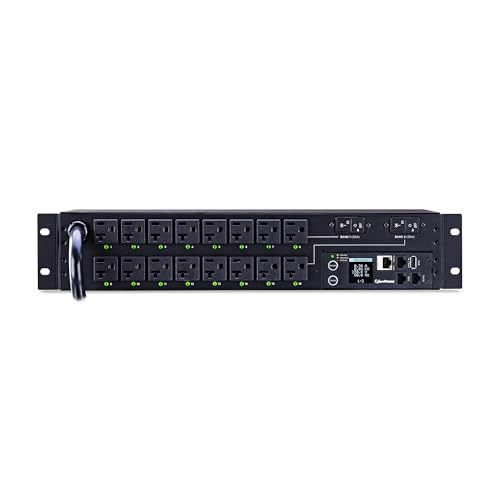
16 SWITCHABLE NEMA 5 20R OUTLETS: Provides local and remote control for individual and multiple outlets

BASIC PDUS: Provide reliable power for critical infrastructure at the rack level; add a local display or inline meter to receive instant power usage feedback, which can help avoid overloads and costly downtime

Single phase PDU: safe, reliable power distribution unit delivers 200/208/240V single-phase AC power to multiple loads from a utility outlet, generator or UPS system in a high-density it environment. Ideal no-frills basic PDU for networking, telecom, security, PDU networking, and audio/video applications
Remote Control Capabilities for PDUs
A considerable advantage of modern power distribution units (PDUs) is their remote control capabilities, which empower users to manage individual outlet power states efficiently. Through web interfaces or mobile applications, users can access their PDUs for remote management, allowing for quick adjustments without needing physical access. Advanced features further enhance functionality, including the ability to integrate with automation platforms like Ansible, enabling automated power management and scheduling. Many modern PDUs also support alerts and notifications for power-related issues, improving reliability by facilitating proactive measures. Remote reboot capabilities considerably contribute to system uptime, minimizing downtime for critical servers and devices. These features make PDUs invaluable for users seeking efficiency and control in their homelabs. Additionally, features like surge protection can help safeguard devices from unexpected voltage spikes, ensuring long-term reliability.
Recommended Products

5.8kW 208/240V Switched 30A PDU, 2U rackmount, Reversible housing

100-120V/15A (Derated to 12A) Switched Power Distribution Unit (PDU) delivers and manages reliable power to electronic equipment, servers, and network/telecom devices

16 switchable & mete PDU with NEMA5-15P outlets and two power distribution unit with IEC320 C13, 2 input power cords
Monitoring Power Consumption in Your Homelab
Effective energy management in a homelab often hinges on the ability to monitor power consumption accurately. Implementing managed PDUs equipped with metering capabilities enables users to track power usage for each device. This granular monitoring helps in understanding load distribution effectively, allowing identification of high-energy-consuming devices. Integrating tools like Zabbix enhances monitoring by generating alerts when power usage exceeds predefined thresholds, ensuring immediate response to power-related issues. Additionally, many modern PDUs offer remote management features that allow users to control power states through web interfaces or automation scripts. By analyzing collected power consumption data, informed decisions regarding energy efficiency upgrades can be made, aiding in load redistribution and minimizing the risk of overheating. Moreover, utilizing Automatic Voltage Regulation (AVR) can further stabilize power supply and enhance the longevity of connected devices.
Best Practices for Cable Management
While it may seem simple, proper cable management plays an essential role in optimizing the functionality and longevity of homelab setups. Implementing systematic labeling for power and network cables can reduce troubleshooting time by up to 50%. Organizing cables by function and length guarantees that shorter cable runs are used for nearby connections, minimizing clutter and avoiding airflow obstruction. Using zip ties, Velcro ties, raceways, and cable trays prevents tangling, making connections accessible without disrupting other components. Maintaining color-coded cables, such as blue for networking and red for power, simplifies troubleshooting during outages. Regularly checking and resecuring cables after moving equipment helps maintain order and prevents wear that can lead to connectivity issues in the future. Incorporating cord organization solutions can further enhance the tidiness and accessibility of your homelab setup.
Cooling Solutions for Power Efficiency
When managing a homelab setup, prioritized cooling solutions are essential for maintaining power efficiency and preventing equipment failure. Effective options, such as AC Infinity fans, enhance airflow within racks, minimizing the risk of overheating. Blanking panels in unused rack spaces improve cooling efficiency by preventing hot air recirculation. Regular maintenance, including cleaning dust from fans and inspecting air filters, sustains equipment performance and longevity. Passive cooling methods, such as optimizing cabinet ventilation, complement active cooling solutions and reduce reliance on powered fans, thereby saving energy. Implementing temperature monitoring systems with sensors allows users to proactively manage cooling needs and receive alerts for impending overheating situations, ultimately ensuring smooth operation in environments utilizing active PoE technology. Additionally, understanding energy efficiency features in your power distribution setup can further enhance cooling and operational performance.
Integrating PDUS With Home Automation Systems
Integrating PDUs with home automation systems greatly enhances the management of power resources in a homelab setting. Managed PDUs, equipped with network connectivity, allow for remote control of power outlets, enabling users to monitor energy consumption effectively. These systems can interface with platforms like Ansible, facilitating automated power management and providing real-time insights into energy usage per plug. By incorporating smart PDUs, users can schedule power cycling for servers and devices, optimizing operational efficiency based on predetermined patterns. Compatibility with various home automation platforms guarantees that PDUs become part of a cohesive smart home ecosystem. This integration not only streamlines operations, but also adds considerable convenience to energy management strategies within a homelab environment.
Common Challenges and Solutions in Power Distribution
Power distribution in homelabs presents a variety of challenges that require careful consideration and strategic planning. A reliable PDU is essential, as it provides multiple outlets to simplify power access for servers and networking equipment. Common issues include power outlet shortages, which can be addressed by using higher-capacity PDUs or consolidating devices with USB power solutions, such as the Anker PowerPort, capable of six outlets. Monitoring power consumption through managed PDUs allows users to track energy usage, enhancing troubleshooting capabilities. Regular organization of power cables post-PDU installation improves airflow, reducing overheating risks. Selecting PDUs with remote management features further streamlines control, enabling users to manage outlet states from any location, facilitating automation, and minimizing manual intervention.
Frequently Asked Questions
How Many PDUS per Rack?
Typically, a rack may utilize one PDU for every 15 to 20U, depending on PDU types and capacity. High-density environments might necessitate multiple PDUs to guarantee balanced power distribution and redundancy across the setup.
What Are Common PDU Problems?
Power Distribution Units can experience a symphony of issues: outlet failures, heat management challenges, and capacity constraints. PDU troubleshooting tips often address these installation challenges, helping users navigate the intricate dance of power management.
What Is a Basic Rack PDU?
A basic rack PDU is a device designed to distribute electrical power to multiple equipment within a server rack. It typically features standard power outlets and various power ratings, ensuring efficient power management without advanced functionalities.
Where Should PDU Go in Rack?
PDU positioning should prioritize efficiency, placing the unit at the top or bottom of the rack. This enhances rack organization, minimizes cable clutter, improves accessibility, and promotes ideal airflow away from heat-generating equipment.


